 New Arrival
 Mobile Phones
 Tablets
 Laptop
 TV
TV Accessories
 Kitchen Appliances
 Refrigerators
 Washing machines
 Air Conditioners
 Personal Care
 Home Automation
 Crockery
 Pressure Cookers
 Induction Cooktops
 Electric Kettles
  Air Fryer
 Chopper
 Wet Grinders
 Chimney
 Dish Washers
 Hand Blenders
 Ovens / Toasters /Grillers
 Gas Stoves
 Pots & Pans
 food-processor
 Dining-and-serveware
 Electric-cookers
 Fans
Fans Irons
Irons Water Heaters
 Water Purifier
 Air Coolers
 Vacuum Cleaners
 Sewing Machines
 Voltage Stabilizers
 Inverters
 Emergency Lights
 Water Dispenser
 Air Purifier
 Torch
Torch Mobile Accessories
 Smart Wearables
 Speakers
 Computer Accessories
 Camera Accessories
 Gaming & Accessories
 Entertainments
 Graphics Cards
 Microphone
 Car & Bike Essentials
 Power Banks
 Connectors
 Memory Cards
 Mobile Chargers & Cables
 Mobile Holders
 Smart Bands
 Sound Bars
 Home Theatres
 Portable/Trolley Speakers
 External Hard Disks
 Pendrives
 Mouse
Mouse Keyboards
 Web Cams
 USB Hubs
 Printers
 Monitor
 Network components
 Laptop-Tables
 Tripods
 Gaming Consoles
 TV Streaming Devices
 Smart Assistants
 FM Radio
 Shavers
 Hair Dryers
 Hair Straighteners
 Perfume
 Electric Toothbrush
 Projectors
 Wi-Fi Camera
 Smart Lock
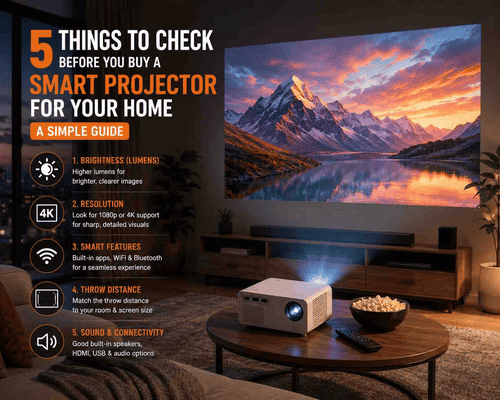
5 Things to Check Before You Buy a Smart Projector for Your Home: A Simple Guide
Planning to buy a smart projector? Discover the five essential factors to consider before making your purchase, from brightness and resolution to throw distance, smart features, and connectivity. This guide also recommends some of the best smart projectors available at myG.
A home theatre used to mean a dedicated room, a big budget, and a lot of wiring. A smart projector changes that completely, turning any blank wall into a 100-inch screen for a fraction of the cost of an equivalent TV.
But projectors are not as simple to buy as TVs. Brightness ratings are inconsistent across brands, resolution claims can be misleading, and a projector that looks perfect in a dim showroom demo can disappoint in your actual living room with its windows and evening lights. Most buyers find this out only after bringing one home.
This guide cuts through that confusion. Five things that actually determine whether a smart projector will work well in your home. Get these right and the rest falls into place.
By the end of this guide, you will know:
- •Why brightness in lumens matters more than any other spec
- •The resolution truth — what 4K support actually means on a budget projector
- •Why smart features and built-in apps save you from extra cables and devices
- •How throw distance determines your actual screen size at home
- •Which projectors are genuinely worth buying
1. Brightness (Lumens) — The Single Most Important Number
Brightness, measured in lumens, determines whether your projector image looks sharp and vivid or washed out and dull. This is the single most important specification to check — more important than resolution, more important than smart features.
| Lumens | Best Use Case | Room Lighting Needed |
| Under 2,000 | Dedicated dark home theatre rooms only | Must be fully dark |
| 2,000 to 3,000 | Evening movie nights, curtains drawn | Dim to dark room |
| 3,000 to 8,000 | Most Indian living rooms, mixed use | Moderate ambient light acceptable |
| 8,000 and above | Bright rooms, daytime use, large screens | Works even with some daylight |
The honest rule: If your living room has windows that let in daylight or you regularly use the projector with some lights on, you need a projector rated at 3,000 lumens or higher. Anything below this will look noticeably dim and washed out outside of a dark room.
2. Resolution — What 4K Support Actually Means
Resolution determines image sharpness and detail. Many budget projectors advertise '4K support' — this phrase needs careful reading.
- •Native 4K: The projector's actual chip displays 4K resolution. Extremely rare below Rs. 50,000 in India.
- •4K Support / 4K Input Support: The projector can accept and play a 4K video file, but downscales it internally to its native resolution (usually 1080p or lower) before displaying it. This is what most budget and mid-range smart projectors offer.
What this means for you: A projector with 4K support but a lower native resolution will still play 4K content from Netflix or YouTube without errors but the displayed image sharpness is determined by the native resolution, not the input it accepts. For home use on a screen up to 100 inches at a normal seating distance, Full HD (1080p) native resolution is genuinely sufficient and delivers a sharp, satisfying picture.
3. Smart Features — Built-In Apps vs External Streaming Devices
A smart projector includes a built-in operating system with direct access to streaming apps — similar to a smart TV. This eliminates the need for a separate streaming stick or set-top box connected via HDMI.
- •Look for: Built-in Android or proprietary smart OS, WiFi connectivity, pre-loaded or downloadable apps for YouTube, Netflix, Prime Video, and screen mirroring support for phones and laptops.
- •Bluetooth audio: Useful for connecting an external speaker or soundbar — most projector built-in speakers are adequate for casual viewing but benefit from an external speaker for movie nights.
- •Keystone correction: Auto keystone correction automatically squares off the image if the projector is not placed exactly perpendicular to the wall or screen. This is a genuinely useful convenience feature — manual keystone correction requires careful physical adjustment every time you move the projector.
For most home buyers, a smart projector with built-in apps is worth the modest price premium over a basic projector — it removes the complexity and extra cable clutter of connecting external streaming devices every time.
4. Throw Distance — The Spec That Determines Your Actual Screen Size
Throw distance is the distance between the projector lens and the screen or wall. This single measurement determines how large your image will be in your specific room and it is the spec most buyers forget to check before purchasing.
- •Standard throw projectors: Need 2.5 to 4 metres of distance from the wall to produce a 100-inch image. This works well for larger living rooms.
- •Short throw projectors: Can produce a large image from a much shorter distance, useful for smaller rooms or apartments where you cannot place the projector far from the wall.
Before buying: Measure the actual distance available in your room from your likely projector placement point to the wall or screen. Check the manufacturer's throw distance chart for the screen size you want at that distance. A projector that needs 4 metres of throw distance simply will not deliver a large image in a compact Kerala apartment living room.
5. Sound and Connectivity — The Often-Overlooked Essentials
Built-in speakers on most projectors are adequate for casual daytime viewing but underwhelming for movie nights. Check what the projector offers.
- •Built-in speaker wattage: 5W to 10W is standard on most home projectors — fine for everyday use, limited for a true cinematic experience.
- •Bluetooth audio out: Lets you pair a soundbar or Bluetooth speaker for significantly better audio without extra cables.
- •HDMI and USB ports: Essential for connecting a laptop, gaming console, or external storage. Check the number of HDMI ports if you plan to connect multiple devices.
- •WiFi and screen mirroring: Lets you cast content directly from your phone or laptop without cables — a convenience feature that has become standard on smart projectors.
Best Smart Projectors Available at myG
Lapcare Laplay LED Projector LLP-012
Lapcare Laplay LED Projector LLP-012 - 2,500 lumens. A genuine entry point for buyers trying a home projector setup for the first time — casual movie nights, kids' content, and everyday streaming in a dim to moderately lit room. At under Rs. 6,000, the value proposition for occasional home use is strong.
Zebronics PixaPlay 62 Projector
Zebronics Pixaplay 62 Projector - 3,000 lumens. A step up in brightness from the Lapcare LLP-012, making it more usable in moderately lit rooms without needing to fully darken the space. Good mid-budget option for a living room used for regular movie and OTT viewing through the evening.
Zebronics PixaPlay 58 Smart Projector
Zebronics Pixaplay 58 Smart Projector - 12,000 lumens. 4K support. The high brightness rating makes this projector usable even with some ambient light in the room — a genuine advantage for Kerala living rooms that are rarely fully dark in the evening. With 4K input support, this is the projector to choose if you plan to stream 4K content regularly and want the best image quality available.
Frequently Asked Questions
What is the best projector for home use in India?
It depends on your room and budget. For occasional casual use in a dim room, the Lapcare LLP-012 at Rs. 5,999 is a sound entry choice. For regular evening viewing with some ambient light, the Zebronics PixaPlay 62 offers better brightness. For the best picture quality with 4K support and high brightness suited to brighter rooms, the Zebronics PixaPlay 58 is the strongest option at myG.
How many lumens do I need for a home projector?
For a room with some ambient light — most Indian living rooms in the evening — look for at least 3,000 lumens. For a fully darkened dedicated home theatre space, 2,000 to 2,500 lumens is sufficient. For rooms with significant daylight or daytime use, 8,000 lumens and above is recommended.
What is the projector price in India for a decent smart projector?
A genuinely usable smart projector with built-in apps and reasonable brightness starts from approximately Rs. 6,000 in India. Budget models in the Rs. 6,000 to Rs. 10,000 range work well for casual home use. Premium smart projectors with high brightness and 4K support start from around Rs. 17,000.
Does 4K support mean the projector displays true 4K resolution?
Not necessarily. Most budget and mid-range projectors with '4K support' can accept and play 4K video files but downscale them to their native resolution — typically 1080p or lower — before displaying. True native 4K projectors are rare below Rs. 50,000 in India. For home use at typical screen sizes, Full HD native resolution delivers a genuinely sharp picture.
Can I use a smart projector without a separate streaming device?
Yes — that is the core advantage of a smart projector over a basic one. Built-in apps for YouTube, Netflix, Prime Video, and screen mirroring let you stream directly without connecting an external Fire TV Stick, Chromecast, or similar device. This is one of the most convenient features to check before buying.
How far should a projector be from the wall for a 100-inch screen?
This depends on the specific projector's throw ratio, which varies by model. As a general guide, standard throw projectors typically need 2.5 to 4 metres of distance to produce a 100-inch image. Always check the specific throw distance chart for the projector model you are considering and measure your actual room before buying.
Conclusion: Five Checks, One Confident Purchase
A smart projector is one of the best value upgrades for home entertainment in 2026 but only if the five fundamentals are right for your specific room. Brightness suited to your lighting. Resolution that matches realistic expectations. Smart features that remove cable clutter. Throw distance that fits your actual space. And sound and connectivity that meet your real usage.
- Casual first-time buyer: Lapcare LLP-012
- Regular evening viewing with some ambient light: Zebronics PixaPlay
- Best picture quality, bright rooms, 4K support: Zebronics PixaPlay 58
Turn any wall into your home theatre. Browse the full range at myg.in or visit your nearest myG store to see a live demo before you buy.
 Earphones