
 New Arrival
 Mobile Phones
 Tablets
 Laptop
 TV
 Accessories
 Kitchen Appliances
 Refrigerators
 Washing machines
 Air Conditioners
 Personal Care
 Home Automation
 Crockery
 Pressure Cookers
 Induction Cooktops
 Electric Kettles
 Air Fryer
 Chopper
 Wet Grinders
 Chimney
 Dish Washers
 Hand Blenders
 Ovens / Toasters /Grillers
 Gas Stoves
 Pots & Pans
 food-processor
 Dining-and-serveware
 Electric-cookers
 Fans
 Irons
 Water Heaters
 Water Purifier
 Air Coolers
 Vacuum Cleaners
 Sewing Machines
 Voltage Stabilizers
 Inverters
 Emergency Lights
 Water Dispenser
 Air Purifier
 Torch
 Mobile Accessories
 Smart Wearables
 Speakers
 Computer Accessories
 Camera Accessories
 Gaming & Accessories
 Entertainments
 Graphics Cards
 Microphone
 Car & Bike Essentials
 Power Banks
 Connectors
 Memory Cards
 Mobile Chargers & Cables
 Mobile Holders
 Smart Bands
 Sound Bars
 Home Theatres
 Portable/Trolley Speakers
 External Hard Disks
 Pendrives
 Mouse
 Keyboards
 Web Cams
 USB Hubs
 Printers
 Monitor
 Network components
 Laptop-Tables
 Tripods
 Gaming Consoles
 TV Streaming Devices
 Smart Assistants
 FM Radio
 Shavers
 Hair Dryers
 Hair Straighteners
 Perfume
 Electric Toothbrush
 Projectors
 Wi-Fi Camera
 Smart Lock
Your Child Is Asking for a Tablet — Here’s How to Choose the Right One Without Regretting It
A practical guide to choosing the right tablet for your child, covering essential features, parental controls, durability, screen time and budget considerations.
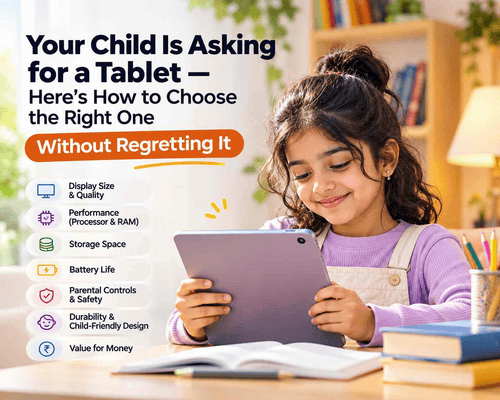
Choosing the best tablet for your child involves more than finding a device with a good display or an affordable price. Your child may need it for online classes, educational apps, digital drawing or simply exploring age-appropriate content. But will the tablet be suitable for their age? Can it handle the apps they need? And is it worth spending more on a device they might outgrow in a few years?
The challenge is that not every tablet is designed with children's needs in mind. A budget model may struggle with everyday applications, while an expensive one could offer features your child rarely uses. Parental controls, screen size, durability and battery life also deserve attention.
So, whether you're considering an Android tablet or an iPad, here's what to look for before making a purchase you'll feel good about.
Does Your Child Really Need a Personal Tablet?
Before comparing models, think about why your child wants one. The reason should guide your purchase.
A tablet can be useful for:
- Online learning: Attending classes, accessing study materials and using educational apps.
- Reading: Exploring digital storybooks, comics and age-appropriate reading applications.
- Creative activities: Drawing, colouring, making presentations and learning basic digital skills.
- Entertainment: Watching age-appropriate videos, listening to music and playing games.
- School projects: Researching topics, preparing assignments and practising new skills.
However, buying a tablet does not automatically mean your child will use it productively. It can also become a source of distraction if there are no clear boundaries.
A personal tablet is not essential for every child. Depending on their age and needs, a shared family device may be a more practical starting point. If you decide to buy one, think about how it will fit into your child's daily routine rather than buying it simply because it is popular.
Kids' Tablet or Regular Tablet: Which One Should You Buy?
You'll find tablets marketed specifically for children, as well as regular tablets that can be configured for younger users. Both options have their advantages.
| Feature | Kids' Tablet | Regular Tablet |
| Design | Often includes a colourful, child-friendly design | Usually has a more conventional design |
| Protection | Some models include protective cases | A separate protective case may be needed |
| Software | May include child-focused apps or content | Offers a wider range of apps and services |
| Parental controls | Depends on the model and software | Can offer built-in parental control features |
| Long-term use | May be limited by hardware or software | Can be more versatile as your child grows |
A dedicated kids' tablet may be convenient for younger children, particularly if it comes with a protective case and suitable child-focused features.
A regular tablet may be a better long-term option if your child needs it for schoolwork, video lessons, reading and other activities. You can make it more child-friendly with parental controls, a durable case and age-appropriate apps.
The important thing is not the label on the box. Check the actual software, safety settings, performance and build quality before deciding.
7 Things to Check Before Buying a Tablet for Your Child
Once you understand how your child will use the device, compare the features that will make a real difference.
1. Display Size and Screen Quality
The display is one of the first things to consider because your child may use the tablet for reading, video lessons, drawing and watching educational content.
A screen around 8 to 11 inches can be a practical size for many children, depending on their age and how they use the device.
Consider these points:
- Screen size: A smaller tablet is easier to carry, while a larger display offers more space for reading and learning.
- Resolution: A clear display makes text, images and videos easier to view.
- Brightness: Adjustable brightness is useful when moving between different lighting conditions.
- Viewing comfort: Look for a display that is comfortable to use, and encourage regular breaks rather than prolonged continuous viewing.
You don't necessarily need the biggest or most expensive display. Choose a size that your child can comfortably hold and use.
2. Performance: Processor and RAM
Imagine your child opening a learning application while a video lesson is running, only for the tablet to freeze or take too long to respond. That can quickly become frustrating.
The processor and RAM influence how smoothly a tablet handles everyday tasks.
For basic activities such as reading, browsing and educational apps, a tablet with modest specifications may be sufficient. If your child will use multiple learning apps, attend online classes and play more demanding games, look for a more capable processor and adequate RAM.
Don't choose a tablet based only on a large RAM number. Check the processor, software optimisation and overall specifications together.
3. Storage Space for Apps and Learning Materials
Children may download educational applications, save videos, store school documents and take pictures of their projects. These files can use up storage faster than expected.
Before buying, consider:
- 64GB storage: Can suit lighter usage, depending on the number of apps and files.
- 128GB storage: Offers more room for applications, documents, downloads and media.
- Expandable storage: Some Android tablets support microSD cards, which can provide additional space.
Also check whether the tablet supports the applications your child needs. A device with plenty of storage is not useful if it cannot run the required learning apps.
4. Battery Life for Schoolwork and Everyday Use
Battery life matters when your child uses a tablet for online classes, homework or travel.
Look at the manufacturer's battery claims, but remember that actual usage time depends on screen brightness, Wi-Fi, applications and other settings.
A tablet with a good battery backup can reduce the need for frequent charging. Also check the charging port, charger compatibility and charging time.
If your child regularly attends online classes, consider whether the tablet can comfortably last through the sessions without needing to be plugged in.
5. Parental Controls and Child Safety
This is one feature parents should never overlook.
A tablet may have excellent specifications, but it still needs to be configured properly before a child starts using it. Parental controls can help you manage screen time, app downloads, purchases and access to age-inappropriate content.
Depending on the device, useful options may include:
- Setting daily screen-time limits.
- Scheduling device downtime.
- Approving app downloads and purchases.
- Restricting access to selected websites and content.
- Managing app permissions and privacy settings.
- Reviewing your child's device activity.
For Android devices, Google Family Link offers tools to manage screen time and supervise a child's account on compatible devices. On an iPad, Apple's Screen Time and parental controls allow parents to manage app access, content restrictions and usage schedules.
Remember that parental controls are not a complete safety solution. Filters can miss unsuitable content, so it is important to review settings, choose appropriate apps and talk to your child about safe online behaviour.
6. Durability and Accessories
Children may not handle electronic devices as carefully as adults. A tablet can be dropped, scratched or exposed to accidental spills.
A protective case is therefore a sensible addition, especially for younger children.
Look for:
- A sturdy protective case with raised edges.
- A screen protector to reduce the risk of scratches.
- A comfortable stand or adjustable case for video lessons.
- A suitable stylus if your child enjoys drawing or handwriting.
- Compatible headphones with an appropriate volume setting.
Some kids' tablets include protective cases in the box. For regular tablets, check the availability and cost of compatible accessories before buying.
7. Software Updates and Long-Term Use
A tablet may look like a good deal today, but what happens when your child needs more demanding applications a year or two later?
Check the operating system, software update policy and compatibility with the applications your child may need in the future.
A tablet with reliable software support can remain useful for longer. It may also offer better security and compatibility as apps receive updates.
Think beyond your child's current needs. A device that supports reading and simple learning activities today may also need to handle school assignments, video calls and creative applications later.
What Is a Sensible Budget for a Child's Tablet?
The tablet price in India varies considerably depending on the brand, display, processor, storage, connectivity and additional features.
Instead of choosing the cheapest tablet available, decide your budget based on how your child will use it.
Here are three broad buying considerations:
For basic learning and entertainment
If your child mainly needs a tablet for reading, simple educational apps and occasional videos, focus on reliable everyday performance, sufficient storage and parental controls. You may not need a premium device.
For regular schoolwork and online classes
If the tablet will be used frequently for video lessons, assignments, browsing and multiple applications, consider a model with a better processor, adequate RAM, a comfortable display and dependable battery life.
For creative activities and long-term use
If your child enjoys digital drawing, more demanding applications or other creative tasks, consider a higher-performance tablet with stylus support where required and enough storage for projects.
The best tablet is not necessarily the most expensive one. It is the one that meets your child's actual requirements without making you pay for features they may never use.
How Much Screen Time Is Appropriate for Children?
There is no single screen-time number that works for every child and every family. Age, the type of content, school requirements, sleep and other daily activities all matter.
A useful approach is to focus on the quality of screen use and whether it is affecting other important activities.
For example:
- Make time for outdoor play, physical activity and hobbies.
- Avoid using the tablet during meals and family conversations.
- Keep devices away from bedtime routines and bedrooms at night.
- Encourage breaks during longer sessions.
- Choose apps and videos that support learning, creativity and age-appropriate entertainment.
- Review your family's screen-time rules as your child grows.
A tablet should support your child's activities, not replace reading, play, sleep, exercise or time with family and friends.
How to Choose the Best Tablet for Kids Based on Their Needs
The best tablet for kids depends on their age, how they plan to use it and your budget. Before making the final decision, consider these simple guidelines:
- For younger children: Choose a lightweight tablet with a protective case, easy-to-use features and reliable parental controls.
- For school students: Prioritise smooth performance, good battery life and compatibility with educational applications.
- For creative activities: Look for stylus support, a good display and sufficient storage for drawings and projects.
- For long-term use: Consider software update support, overall performance and whether the tablet can handle your child's changing needs.
You don't have to choose the most expensive model to get a good experience. Focus on the features your child will actually use, compare available options and check the warranty before purchasing.
Find the Right Tablet for Your Family at myG
Whether you're looking for a tablet for online classes, reading, creative activities or everyday entertainment, the right device should match your child's needs and your family's budget.
At myG, you can explore tablets from brands such as Apple, Samsung, Lenovo and Xiaomi. Compare screen sizes, RAM, storage, connectivity and other features to find an option that suits your requirements.
Explore the latest tablets at myG, compare available models and choose a device your child can use meaningfully as they learn and grow.
 Earphones