 New Arrival
 Mobile Phones
 Tablets
 Laptop
 TV
TV Accessories
 Kitchen Appliances
 Refrigerators
 Washing machines
 Air Conditioners
 Personal Care
 Home Automation
 Crockery
 Pressure Cookers
 Induction Cooktops
 Electric Kettles
  Air Fryer
 Chopper
 Wet Grinders
 Chimney
 Dish Washers
 Hand Blenders
 Ovens / Toasters /Grillers
 Gas Stoves
 Pots & Pans
 food-processor
 Dining-and-serveware
 Electric-cookers
 Fans
Fans Irons
Irons Water Heaters
 Water Purifier
 Air Coolers
 Vacuum Cleaners
 Sewing Machines
 Voltage Stabilizers
 Inverters
 Emergency Lights
 Water Dispenser
 Air Purifier
 Torch
Torch Mobile Accessories
 Smart Wearables
 Speakers
 Computer Accessories
 Camera Accessories
 Gaming & Accessories
 Entertainments
 Graphics Cards
 Microphone
 Car & Bike Essentials
 Power Banks
 Connectors
 Memory Cards
 Mobile Chargers & Cables
 Mobile Holders
 Smart Bands
 Sound Bars
 Home Theatres
 Portable/Trolley Speakers
 External Hard Disks
 Pendrives
 Mouse
Mouse Keyboards
 Web Cams
 USB Hubs
 Printers
 Monitor
 Network components
 Laptop-Tables
 Tripods
 Gaming Consoles
 TV Streaming Devices
 Smart Assistants
 FM Radio
 Shavers
 Hair Dryers
 Hair Straighteners
 Perfume
 Electric Toothbrush
 Projectors
 Smart Security Accessories
 Wi-Fi Camera
How to Speed Up a Slow HP Laptop: Practical Fixes That Actually Work
A slow HP laptop can turn everyday tasks into frustrating delays. Simple actions like opening a browser, attending online meetings, or switching between applications shouldn’t feel like a struggle. If your HP laptop is lagging, freezing, or taking too long to start, the problem is usually not permanent and in most cases, it’s fixable.
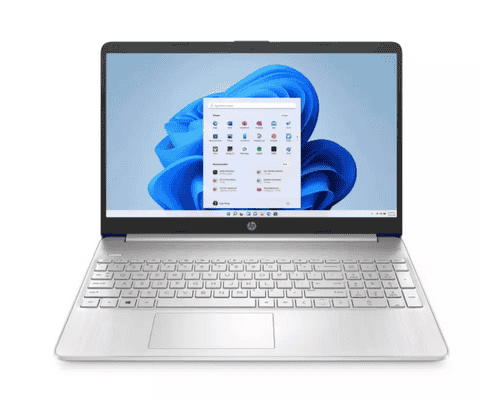
A slow laptop can quietly drain your productivity. Simple tasks like opening a browser, joining online meetings, or switching between tabs start taking longer than they should. If you’re using an HP laptop and noticing lag, freezing, or long startup times, you’re not alone and the good news is that most speed issues are fixable.
This guide explains how to speed up a slow HP laptop using practical, expert-backed steps that real users rely on. We’ll cover software fixes, hardware upgrades, and smart usage habits in clear language. You’ll also learn when it’s better to stop fixing and start upgrading especially with newer HP laptop latest models competing for the title of the best laptop 2025.
1. Too Many Startup Programs Slowing Things Down
One of the most common reasons HP laptops slow down is background programs launching automatically when the system starts. These apps quietly consume memory and processing power, even when you don’t need them.
Over time, installed software adds itself to startup without you realizing it. This increases boot time and makes the laptop feel sluggish right from the start. Disabling unnecessary startup apps can instantly improve performance without spending any money.
2. Low Storage Space Affects Overall Speed
When your laptop’s storage is almost full, the system struggles to manage temporary files and updates. This is especially noticeable on older models using traditional hard drives.
A healthy system usually needs at least 20–25% free storage space to run smoothly. Clearing unused files, old downloads, and unused software gives your HP laptop room to breathe and often results in noticeable speed improvement.
3. Outdated Software and Drivers
Running outdated operating systems or drivers can slow performance and cause compatibility issues. Updates are not just about new features; they fix bugs, improve stability, and optimize performance.
HP regularly releases driver updates tailored to specific models. Keeping your system updated ensures your laptop runs the way it was designed to.
4. Hard Drive vs SSD: A Game-Changing Upgrade
If your HP laptop still uses a traditional hard disk drive (HDD), upgrading to a solid-state drive (SSD) is one of the fastest ways to boost speed.
Why SSD Makes a Big Difference
- Faster boot times
- Quicker app launches
- Smoother multitasking
- Better overall responsiveness
This single upgrade often makes an older HP laptop feel almost new again.
5. Not Enough RAM for Modern Usage
Today’s applications demand more memory than ever. Browsers alone can use several gigabytes of RAM with multiple tabs open.
If your HP laptop struggles during multitasking, upgrading RAM can help significantly especially for students, professionals, and remote workers.
6. Malware and Unwanted Background Processes
Hidden malware, adware, or poorly optimized apps can silently slow your system. Even if your laptop seems safe, occasional scans are essential.
A trusted security scan helps remove unnecessary background processes and keeps your data protected while improving speed.
7. Power Settings Limiting Performance
Many HP laptops are set to power-saving mode by default to extend battery life. While useful on the go, this can limit CPU performance and make the system feel slow.
Switching to a balanced or performance mode when plugged in allows the laptop to use its full potential.
Quick Fix Checklist to Make Your HP Laptop Faster
- Disable unnecessary startup apps
- Free up storage space
- Update Windows and HP drivers
- Scan for malware
- Adjust power settings
- Upgrade to SSD if possible
These steps alone solve speed issues for most users.
When Fixing Isn’t Enough: Is It Time to Upgrade?
Sometimes, no amount of tweaking can match the performance of modern hardware. If your laptop is more than 5–6 years old, struggles with basic tasks, or doesn’t support the latest software updates, upgrading may be the smarter option.
Newer hp laptop latest models offer:
- Faster processors
- Improved battery life
- Better thermal management
- Enhanced security features
Many of these models are strong contenders for the best laptop 2025, especially for work-from-home users, students, and creators.
How Do You Make a Laptop Faster Without Replacing It?
This is one of the most common questions users ask and the answer depends on expectations. Software cleanup and small hardware upgrades can dramatically improve everyday performance. However, for heavy workloads, newer-generation laptops deliver long-term value.
Knowing when to upgrade saves both time and frustration.
(FAQs)
1. How do you make a laptop faster without technical knowledge?
Start by disabling startup apps, freeing storage, and keeping software updated.
2. Does upgrading to SSD really help HP laptops?
Yes. It’s one of the most effective upgrades for speed improvement.
3. Are HP laptops good for long-term use?
With proper maintenance, HP laptops are reliable and durable for many years.
4. How much RAM is enough today?
8GB is the minimum for smooth performance; 16GB is ideal for multitasking.
5. Should I buy a new laptop in 2025?
If performance issues persist, newer models offer better efficiency and value.
6. What makes a laptop the best laptop 2025?
Performance, battery life, build quality, and long-term software support.
Where to Buy HP Laptops with Confidence
When it’s time to upgrade or replace your laptop, choosing a trusted retailer matters just as much as choosing the right model. myG offers a seamless buying experience both online and offline. You can shop online at www.myg.in for fast delivery, easy returns, and exclusive online-only deals, or visit any of MyG’s 140+ showrooms across all districts in Kerala, including restricted authorization outlets, to experience the laptops in person. Every unit sold is 100% genuine, fully certified, covered by warranty, and supported by expert guidance so you can buy with complete confidence and peace of mind.
Conclusion:
A slow HP laptop doesn’t always mean it’s outdated. In many cases, simple fixes like cleaning up software, upgrading storage, or adding RAM can restore speed and reliability. Understanding how to make a laptop faster empowers you to extend the life of your device and get more value from it.
However, when performance limits start affecting productivity, exploring HP laptop latest models may be the better long-term move especially with several strong contenders for the best laptop 2025 offering better speed, efficiency, and future-proof features.
 Earphones